




Screenshot

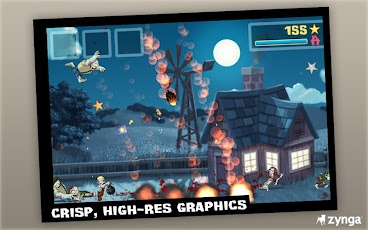
ZombieSmash! is a “Survival Comedy” game, featuring undead-themed castle defense and entertaining, physics-based gameplay. The game casts players as Joey, a lone survivor pit against a herd of writhing, unrelenting zombies - to defeat the undead masses, players must use their fingers to flick and smash them until they're un-undead.
• To aid players in their fight, over 30 specials and upgrades allow for creative zombie demolition - including fun implements like asteroids, wrecking balls, liquid nitrogen and a gigantic, rolling boulder – combine specials (for instance, smash nitrogen-frozen zombies with a boulder!) for added hilarity.
• Sophisticated ragdoll physics produce unique and hysterical zombie deaths, and the proprietary SplatterEngine™ renders adorable cartoon blood and gore in a convincing and entertaining fashion.
• Four game modes provide limitless replay value:
o Campaign Mode challenges players to survive for over 31 intense days against the mounting zombie threat and another 30 nights in the NEW CAMP NOWHERE campaign.
o Endless Siege Mode confronts them with a never-ending zombie assault - hold out as long as possible, racking up an ever-rising body count.
o Sandbox Mode gives you all the tools to rain destruction down on those stinking, moaning zombies without any of the peril.
o Bonus Nights Mode : Smash and destroy zombies in new ways! Unlock this special mode through extended gameplay and using your braaains!
How to Download:
We need to Download and setup Chainfire3D for lower Specs Android Phones like Samsung Galaxy y etc.
Installing Game:
1. Download Zombie Smash.apk. Click Here
2. Download
Zombie Smash Data. Click Here
3. Extract the Data File
4. Connect your phone to your computer.
5. Copy and paste Zombie Smash.apk on your SDcard
6. Copy and paste the extracted data file named "obb" to Android/*HERE*
7. Disconnect your phone to your computer.
8. Install hero of
Zombie Smash.apk file and press done.
To make this game run on low Specs Android Phones like Samsung Galaxy y etc.
9. Open Chainfire3D
10. Open Chainfire3D and open "Default OpenGL Settings"
11. Check "Reduce Texture Quality"
12. Open "Use Plugin" and select "QUALCOMM"
13. Press Home and Open the Game. Enjoy